Chapter 3 of 11
27%
Arcade Drive
Arcade drive is a method of controlling a robot using the vertical axis of the joystick to control the forward and backward motion, while using the horizontal axis to control the turning motion. Below is a flowchart of how you can implement code for arcade drive:
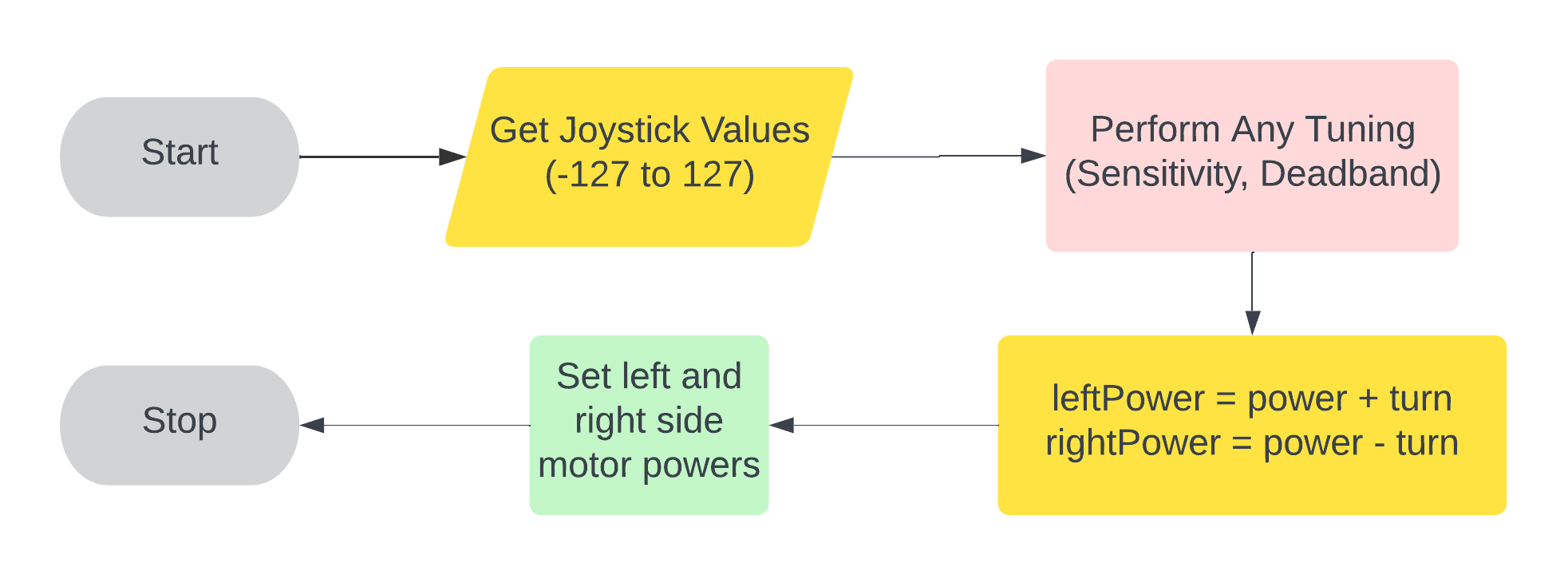
- Perform Any Tuning refers to adjusting your controller's sensitivity or adding a deadband (more on this later)
- Power refers to the joystick movement in the y-direction
- Turn refers to the joystick movement in the x-direction
- Note that the power + turn and power - turn can be swapped sometimes.
To give full power to a motor, you can do the following:
motor.move(127);Create a new file called drive.cpp. Inside, create an arcade drive function using your already defined motors and controller. BONUS: Add a deadband to the joystick movement to prevent the robot from moving when the joystick value is below 5 in any direction.
Adding Other Subsystems
It is very common for you to not have all 8 motors used for driving. All of your other subsystems will be defined very similarily to your drive code.
Let's say you want to code an intake. When the driver holds the R1 button: it intakes. When they hold the R2 button: it outtakes. Here is some sample code for that.
pros::Motor intake(1);

void intakeControl() {
    if (master.get_digital(DIGITAL_R1)) {
        intake.move(127);
    } else if (master.get_digital(DIGITAL_R2)) {
        intake.move(-127);
    } else {
        intake.move(0);
    }
}
// OR

void intakeControl() {
    int intake_power = 127 * (master.get_digital(pros::E_CONTROLLER_DIGITAL_R1) - master.get_digital(pros::E_CONTROLLER_DIGITAL_R2));
    intake.move(intake_power);
}
Note that the .get_digital is used when you hold down a button
There is another case where you may need to press the button multiple times. Let's say you wanted to activate your catapult when you press 'B' and let it continue to shoot until you press 'B' again. Here is some sample code for that:
pros::Motor catapult(10);
bool current_state = false;

void catapultControl() {
    if (master.get_digital_new_press(pros::E_CONTROLLER_DIGITAL_B)) {
        current_state = !current_state;
    }
    if (current_state) {
        catapult.move(127);
    } else {
        catapult.move(0);
    }
}